
Payday, computed
from attendance.
Staff clock in from their phone. Holidays, overtime, deductions, and cash advances are applied for you. You review, tap pay, and print the payslips. No spreadsheets, no manual math.
Pay Period · Every 15 Days
Pay Summary
Net Pay
₱8,390.38
13 days · +₱609.38 · −₱1,319.00
| Date | Status | In | Out | OT Hrs | Amount |
|---|---|---|---|---|---|
| Sep 6 | Day Off | — | — | — | ₱0.00 |
| Sep 7 | Normal | 8:52 AM | 6:04 PM | — | ₱650.00 |
| Sep 8 | Regular Holiday | 8:47 AM | 6:00 PM | — | ₱1,300.00 |
| Sep 9 | Normal | 8:55 AM | 8:10 PM | 2 | ₱853.13 |
- 01
Clock in
Staff time in from their phone with a PIN, selfie, and GPS.
- 02
Review the run
Every day is computed from attendance — edit anything, see the math.
- 03
Approve
OT, leave, and reimbursement requests land on the right payslip.
- 04
Pay & print
Mark paid via cash, bank, or GCash. Print payslips in one click.
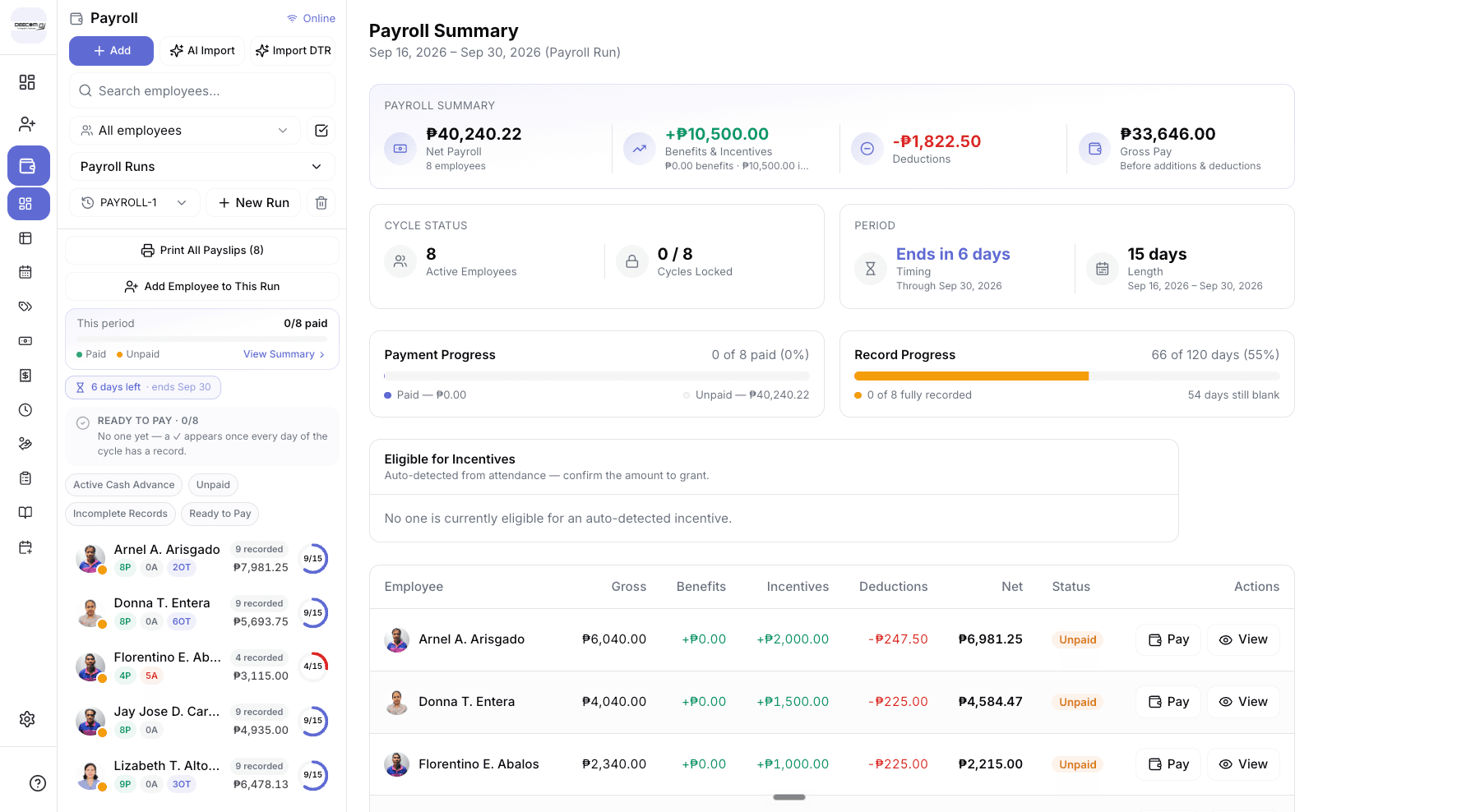
The whole payroll, on one screen.
Net payroll, deductions, who’s been paid, whose records are still incomplete, and who qualifies for an incentive — all updated as attendance comes in.
Time In recorded
8:52 AM
Juan Dela Cruz
Kape Tayo Café
DAILY TIME RECORD
Juan Dela Cruz
Tuesday, September 15, 2026
TIME IN
8:52 AM
TIME OUT
— — : — —
Time Out
not yet recorded
Clock-ins you can actually trust.
Share one link. Employees open it on their phone, enter their PIN, and time in — no app to install, no biometric device to buy.
PIN + front & back selfie
No buddy punching. Every time-in has a face and a timestamp.
GPS on every punch
See exactly where each employee clocked in, with accuracy.
Roving staff, handled
Employees who work across branches pick where they are at time-in.
A receipt for every punch
Staff get a shareable time-in receipt they can save as proof.
Shifts, grace periods & rotations
Set shift start and grace per store, category, shift group, or employee — lates are tracked automatically.
Handbook sign-off
Employees acknowledge your company handbook before they can use the portal.
Every peso, explained.
Each day on a payslip has a “How is this computed?” breakdown. Edit a day and it’s flagged, so you always know what changed.
Payroll runs, your way
Pick any date range and the employees to include — weekly, every 15 days, or monthly. Roll forward to the next period in one click.
Daily or hourly rates
Daily staff earn a full day per time-in. Hourly staff are paid for the hours between their punches. Mix both in one run.
Holiday premiums, built in
Mark the day and the premium applies. Rates are editable, and locked in once marked — a paid payslip never reprices.
- Regular holiday +100%
- Special non-working +30%
- Special working +25%
- Rest day +30%
Overtime only when approved
1.25× the hourly equivalent by default, or a fixed ₱ premium per hour — set per employee, per category, or store-wide.
Deductions & benefits
Fixed ₱ or % of gross, with optional caps. SSS, PhilHealth, and Pag-IBIG come pre-set with employee and employer shares — adjust as you need.
Automatic incentives
Reward perfect attendance and punctuality. “No Absences” and “Always On Time” eligibility is detected for you.
“Boss, pa-vale.”
Handled.
No more notebook of who owes what. Advances are issued, tracked, and paid back through payroll automatically — and your staff can see their balance on their phone.
- Issue cash advances with a credit limit per employee
- Repay in installments or a fixed amount per payroll — deducted automatically
- Net pay never goes below zero — repayments adjust themselves
- Pause, settle, or apply OT pay directly to an advance
- Every movement logged — voided, never deleted
- Expense advances itemised with receipt photos
Filed on their phone. Approved in one tap.
Overtime
Approved hours are written straight onto that day of the payslip.
Leave
Typed leave credits like VL and SL, issued per year, with scheduled days off.
Reimbursements
Staff attach a photo of the receipt. Approved amounts are added to the next payslip.
Pay, lock, print. Done.
Pay any way
Cash, bank transfer, GCash, or cheque — with transaction no. and receipt photo.
Lock on payment
Paid payslips are locked and recorded in the payment ledger.
Undo mistakes
Reverse a payment to reopen the payslip — linked advance entries are voided too.
Print in bulk
Two half-page payslips per A4 sheet, for the whole run at once.
Summary & export
A one-page payroll summary PDF and a CSV export for your accountant.
Holiday breakdown
A report of holiday and premium pay across the period, day by day.
Know your team at a glance.
One screen for the owner: who’s in today, who’s always late, what needs your approval, and where payroll is trending.
Still on Excel? Bring it with you.
Paste or take a photo of your employee list and AI turns it into your roster. Paste your DTR spreadsheet and it becomes attendance logs — deductions and already-paid days included.
Works offline
Keeps running without internet and syncs when you’re back.
Owner-only payroll
Only the owner sees pay. Employees only ever see their own records.
Every branch, one view
Run payroll across branches and for staff who move between them.
Your own server, optional
For larger teams, run it on a local server at your office.
With your POS, or without it.
Add to Ultra POS
Already running Ultra POS? Payroll is a module we switch on for your store — same login, same branches, same data.
About Ultra POSPayroll only
No POS needed. Get attendance, payroll, and HR on their own — ideal for offices, agencies, farms, and service teams.
Book a demoQuestions about payroll?
No. If you already run Ultra POS, Payroll is a module we switch on for your store — same login, same data. If you don't need a POS at all, we set you up with a payroll-only workspace: attendance, payroll, and HR with no cashier screens.
Make the next payday the easy one.
We’ll walk you through a real payroll run using your own setup — rates, shifts, and all.