
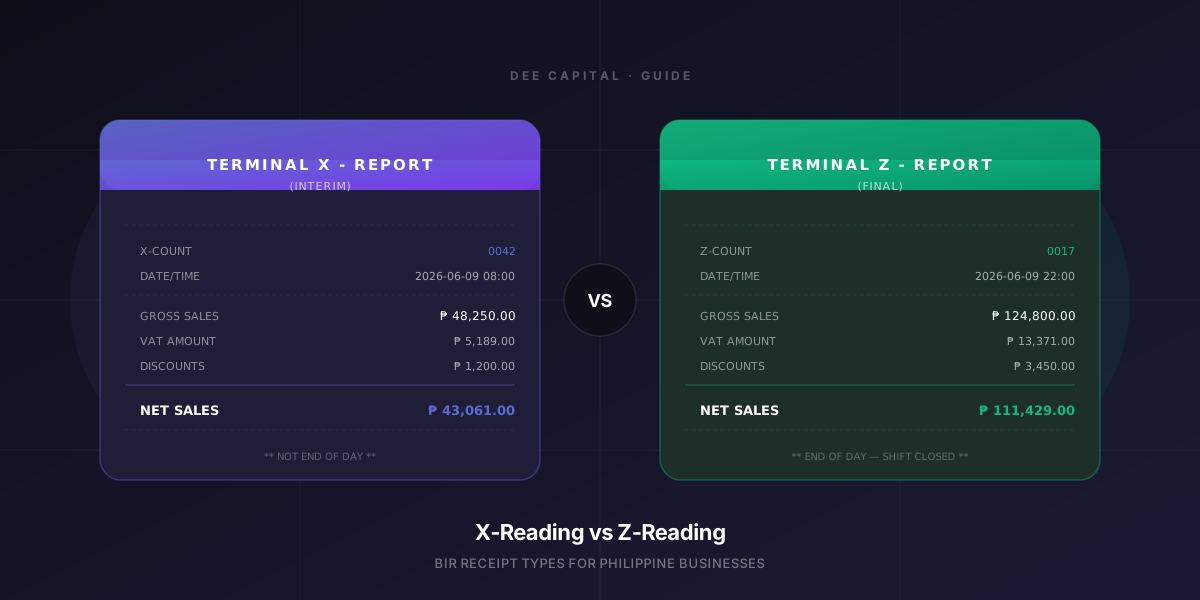
If you run a business in the Philippines with a POS system, you've probably heard the terms X-Reading and Z-Reading thrown around — especially when BIR audits come up. Most cashiers print them without really knowing what they mean. Most owners see a roll of paper come out and move on.
This guide explains every major receipt type your POS should produce, what each one means, and why it matters for your business and your BIR compliance.
The Official Sales Receipt (OR)
This is the receipt every customer gets after a purchase. In the Philippines, the BIR requires every business to issue an Official Receipt (OR) or Sales Invoice for every transaction.
A compliant OR must show:
- Business name and address
- TIN (Tax Identification Number)
- Accreditation Number (ACC#)
- Serial Number (SN) of the CRM/POS
- PTU Number (Permit to Use — the BIR's approval of your machine)
- MIN (Machine Identification Number)
- Date and time of the transaction
- Itemized list with quantities and prices
- VAT breakdown (if VAT-registered)
- Cashier name
A receipt that's missing any of these fields is technically non-compliant. Generic POS software often skips fields like PTU and MIN — which creates problems during audits.
The X-Reading (Terminal X-Report)
An X-Reading is an interim sales summary for the current shift. It does NOT close the shift — it just prints a snapshot of where you are.
When to use it
- Shift swap — when one cashier hands over to another mid-day
- Mid-day checkup — when the manager wants to see how sales are going
- Any time you want a running total without closing the register
What it shows
A proper X-Reading receipt includes:
- XCount — how many X-Readings have been printed for this terminal
- Period — from shift start to now
- Gross Sales and Net Sales
- VAT breakdown (Vatable Sales, VAT Amount, VAT-Exempt Sales, Zero-Rated Sales)
- Discount Summary (Senior Citizen, PWD, NAAC, Solo Parent, Other)
- Payment Breakdown (Cash, GCash, PayMaya, Card, Other)
- Void count and amount
- Opening float
- Grand Total
- Terminal name, cashier name, date and time
The header reads: "Terminal X - Report (Interim)" — the word "Interim" is important. It signals that the day is still open.
Key rule: X-Reading does NOT reset your counters
This is the most misunderstood part. An X-Reading is read-only. It reports what happened — it doesn't clear anything. You can print 10 X-Readings in one day and nothing changes in your sales data.
The Z-Reading (Terminal Z-Report)
A Z-Reading is the final end-of-day sales summary. It closes the shift and, in most POS systems, locks the day so no further transactions can be posted to it.
When to use it
- End of business day — when you're closing the store
- After the last transaction has been processed
- Before you do your cash count
What it shows
A Z-Reading shows the same data as an X-Reading, but:
- It's marked as Final (not Interim)
- The header reads "Terminal Z - Report"
- The ZCount increments — each Z-Reading gets a unique sequential number
- It includes the actual cash count vs. expected cash, and the variance
What happens after a Z-Reading
Once a Z-Reading is generated:
- The shift is closed
- The ZCount advances by 1 (irreversible)
- BIR-compliant systems save this to an Electronic Journal (E-Journal)
- A new shift must be opened before the next transaction
Why the Shift Swap Matters
In businesses with multiple shifts — like restaurants, bubble tea shops, and convenience stores — the shift swap is when one cashier ends their shift and another begins.
The right process for a shift swap is:
- Print an X-Reading before the handover — this documents how much was sold on the outgoing cashier's shift
- Count the cash in the drawer
- Log the handover with both cashiers signing off
- The new cashier starts their shift
If you skip the X-Reading at shift swap, you lose accountability. If your cash is short at the end of the day, you can't tell which shift the variance happened in.
Best practice: Set your POS to automatically print an X-Reading every time a shift swap happens. This removes the human error of forgetting to print it.
The E-Journal (Electronic Journal)
The E-Journal is a behind-the-scenes record that BIR-compliant POS systems must maintain. It stores a digital copy of every receipt issued — even if the paper copy is lost or damaged.
This is not printed. It's stored electronically (either locally or in the cloud) and must be produced if BIR requests it during an audit.
A solid POS system automatically logs every transaction to the E-Journal without any action from the cashier.
The Shift Report (Internal Use)
Some POS systems generate an internal Shift Report that's separate from the BIR-required X/Z-Readings. This is more like a summary for the business owner:
- Sales by category
- Top-selling items
- Cashier performance
- Discount usage
- Comparison to previous shifts
This is optional from a BIR perspective but very useful for operations.
What Your BIR Compliance Checklist Should Look Like
Here's a practical checklist for Philippine businesses using a POS:
| Item | Required | Notes | |------|----------|-------| | PTU (Permit to Use) | ✅ Yes | Must be renewed periodically | | MIN (Machine ID Number) | ✅ Yes | Printed on every receipt | | Official Receipts with TIN, ACC#, SN | ✅ Yes | Every sale | | Z-Reading at end of day | ✅ Yes | Mandatory for CRM/POS users | | E-Journal kept on file | ✅ Yes | Must be producible on request | | X-Reading at shift swap | ✅ Strongly recommended | Not technically required, but standard practice | | Sequential receipt numbering | ✅ Yes | No gaps allowed | | Voided receipts logged | ✅ Yes | Must appear in audit trail |
What Most Generic POS Systems Get Wrong
Most off-the-shelf POS software sold in the Philippines is either:
- Not BIR-accredited — it issues receipts but they're technically not valid ORs
- Missing BIR fields — no PTU, no MIN, no ACC# on the printed receipt
- No proper Z-Reading — just an "End of Day" report with no sequential ZCount
- No E-Journal — receipts are only in the cashier's memory (or paper)
- No shift accountability — no X-Reading on shift swap, so variances can't be traced
When BIR audits happen, these gaps become costly. Penalties for non-issuance of receipts start at ₱1,000 per transaction.
What to Look for in a Compliant POS
When evaluating a POS system, ask these specific questions:
- Does every receipt include PTU, MIN, ACC#, SN, and TIN?
- Does the Z-Reading have a sequential ZCount that increments permanently?
- Is there an E-Journal that stores every transaction digitally?
- Can it print X-Reading on shift swap (manually or automatically)?
- Are voided transactions logged with the cashier's name and reason?
- Is the POS accredited by BIR, or does it produce accreditable receipts?
If a vendor can't answer yes to all six, that's a red flag.
Final Word
X-Reading and Z-Reading aren't just technical terms — they're the audit trail that protects your business.
An X-Reading at every shift swap keeps your cashiers accountable and makes cash variances traceable. A Z-Reading at the end of every day gives you a permanent record of the day's business.
A POS system that makes these automatic — and prints them properly with all required BIR fields — is worth every peso. One that skips them is a liability.
Dee Capital builds custom POS systems for Philippine businesses with full BIR compliance built in — including X-Reading on shift swap, automatic Z-Reading on store close, and E-Journal storage. See our POS packages →